Customer expectations have changed dramatically in 2026. People increasingly expect businesses to respond quickly, understand their questions, provide useful answers and help them complete tasks without unnecessary delays.
For businesses with a high volume of customer inquiries, leads, emails or support requests, handling everything manually can become expensive and difficult to scale. This is where AI customer support automation can make a measurable difference.
Modern AI automation is no longer limited to a basic chatbot that answers frequently asked questions. Businesses can now connect AI with websites, CRM systems, email, forms, databases and internal workflows to automate parts of the customer journey while keeping human support available when it matters.
What Is AI Customer Support Automation?
AI customer support automation uses artificial intelligence together with workflow automation to understand customer requests, provide relevant responses, collect information, perform routine actions and route more complex issues to the right person.
Instead of simply responding to a message, an AI-powered workflow can potentially:
- Understand a customer's question or intent
- Collect contact and requirement information
- Identify whether the visitor is a sales lead or support request
- Answer common questions using approved business information
- Create or update a CRM record
- Send an email or notification to the appropriate team
- Schedule follow-up actions
- Send automated reminders
- Escalate complex conversations to a human
- Record important information for future interactions
This turns AI from a simple conversation tool into part of the company's operational workflow.
Why AI Customer Support Automation Is Growing in 2026
AI adoption in customer service is accelerating. Gartner reported in August 2026 that customer-service leaders had increased AI spending by 38%, while overall service and support budgets increased by only 2%. The research also identified generative AI chatbots, voicebots and agentic AI platforms as technologies expected to deliver significant future value. :contentReference[oaicite:1]{index=1}
At the same time, customers increasingly expect AI systems to help them complete tasks rather than simply provide information. Gartner reported that 58% of customers using generative AI had used it to complete a task, rising to 74% in B2B environments. :contentReference[oaicite:2]{index=2}
This means businesses should think beyond the traditional question-and-answer chatbot.
AI Customer Support Is More Than a Chatbot
A chatbot may answer a question such as "What are your business hours?" But a properly designed AI automation system can go much further.
For example, imagine a potential customer visiting a website and asking:
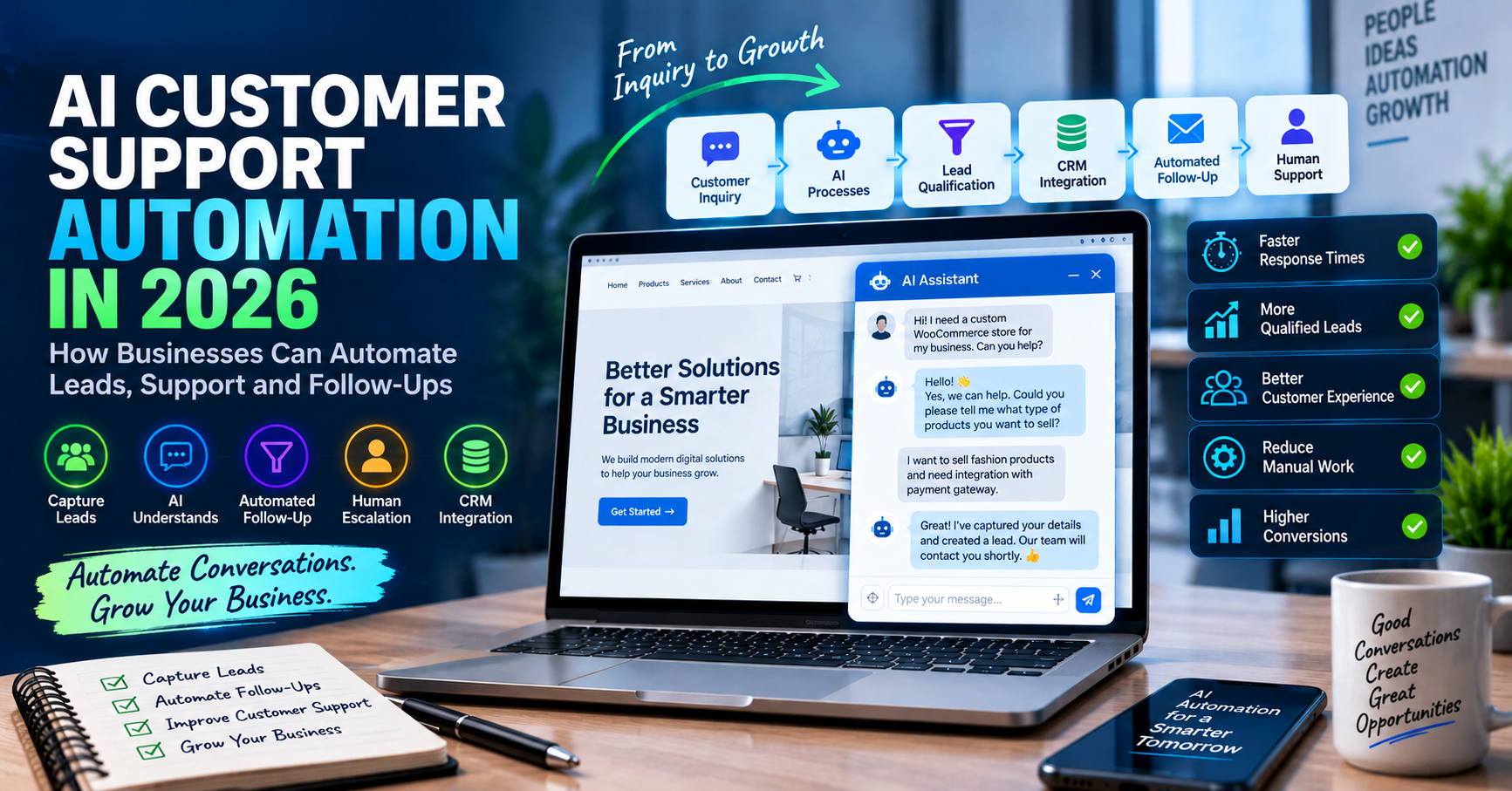
"I need a custom WooCommerce store for my business. How much does it cost and how quickly can you build it?"
An AI-enabled workflow could understand that the visitor is a potential sales lead, ask relevant qualification questions, collect the requirements, store the information in a CRM, notify the sales team and send a follow-up email.
The result is not just an automated answer. It is an automated business process.
1. Automate Website Lead Capture
Many businesses receive leads through contact forms, chat widgets, landing pages and email. The problem is that a lead can easily become cold if nobody responds quickly.
AI automation can help by immediately processing incoming inquiries.
- Capture the visitor's information
- Understand the customer's requirements
- Classify the lead
- Identify important buying signals
- Store the information in a CRM
- Notify the sales team
- Start an appropriate follow-up workflow
This can reduce the amount of repetitive manual work involved in processing every new inquiry.
2. Automate Lead Qualification
Not every website visitor is ready to buy. Sales teams can waste significant time manually reviewing inquiries that do not match their services.
AI can help classify leads according to predefined business rules.
For example, a workflow could categorize leads as:
- High-priority sales opportunity
- Potential future customer
- Existing customer support request
- General information request
- Spam or irrelevant inquiry
The important point is that AI should work together with business rules rather than making uncontrolled decisions.
3. Automate Customer Follow-Ups
One of the most common business problems is inconsistent follow-up.
A company may receive an inquiry today, reply once and then forget to follow up. Another lead may require a reminder after three days. A sales opportunity may need a different sequence entirely.
Workflow automation can handle these repetitive steps.
A typical process could look like:
- Customer submits an inquiry.
- AI analyzes the request.
- The lead is added to the CRM.
- The appropriate team member receives a notification.
- An initial response is sent.
- A follow-up is scheduled.
- If the customer responds, the workflow continues.
- If the customer does not respond, another approved follow-up can be triggered.
- A human can take over whenever necessary.
4. Connect AI With Your CRM
AI becomes significantly more useful when it is connected to the systems a business already uses.
A modern automation architecture can connect AI with CRM platforms, email systems, websites, forms, databases, help desks and internal applications.
For example:
Website Form → AI Processing → CRM → Sales Notification → Email Follow-Up → Reporting
Instead of employees copying information between multiple systems, the workflow can move the information automatically.
5. Automate Email and Support Workflows
Email remains an important communication channel for many businesses, particularly in B2B services.
AI automation can help categorize incoming emails and identify whether they relate to sales, support, billing, technical issues or general questions.
Based on predefined rules, the system can then route the request to the appropriate workflow.
- Sales inquiry → Sales workflow
- Technical issue → Support workflow
- Billing question → Finance workflow
- General question → Information workflow
- Urgent issue → Immediate human escalation
6. Keep Human Support in the Loop
Automation does not mean removing humans from customer service.
In fact, good AI customer support should make it easier for customers to reach a human when human judgment is required.
Gartner reported in August 2026 that 87% of surveyed customers said companies using generative AI for customer service should provide access to a human agent. :contentReference[oaicite:3]{index=3}
This is an important design principle.
AI should handle repetitive and predictable work while people remain available for sensitive, complex or high-value situations.
7. Use AI for Internal Business Automation Too
Customer-facing automation is only one part of the opportunity.
Businesses can also use AI automation internally to process information and reduce repetitive administrative work.
- Summarizing customer conversations
- Extracting information from emails
- Creating internal notifications
- Updating CRM records
- Generating task summaries
- Routing support tickets
- Preparing reports
- Synchronizing data between applications
- Triggering business workflows
This can allow employees to spend more time on customer relationships, sales, strategy and other work that requires human judgment.
8. AI Automation With n8n and Make
Modern automation platforms such as n8n and Make can connect different applications and create multi-step workflows.
For example, a business could build a workflow such as:
Website Inquiry → AI Analysis → Lead Qualification → CRM → Slack/Email Notification → Follow-Up Sequence
Another workflow could be:
Customer Email → AI Classification → Support Ticket → Priority Detection → Team Notification → Customer Response
These systems can be combined with AI models such as OpenAI, Claude or Gemini depending on the requirements, data, workflow and desired architecture.
9. AI Automation Should Be Designed Around Business Problems
One of the biggest mistakes businesses can make is implementing AI simply because AI is trending.
The better approach is to identify a repetitive or expensive business process first.
Ask questions such as:
- Which tasks are repeated every day?
- Where are employees manually copying information?
- Which customer requests are predictable?
- Where are leads being lost because of slow follow-up?
- Which processes require too many separate applications?
- Which support questions are asked repeatedly?
- Where can automation save measurable time?
Once the problem is identified, AI and automation can be introduced where they provide a practical business benefit.
10. Security and Data Privacy Matter
AI automation can process valuable business information, so security should be considered from the beginning.
Depending on the workflow, this may include customer information, sales data, business documents, internal communications or other sensitive information.
A production-ready automation system should therefore consider authentication, access control, data handling, logging, API security and appropriate human approval points.
Businesses should also understand what information is being sent to external AI services and ensure their implementation follows applicable privacy and compliance requirements.
11. Start Small and Expand
Businesses do not need to automate every department at once.
A better approach is to start with one clearly defined workflow where the expected benefit can be measured.
For example:
- Identify one repetitive business process.
- Measure the current time and cost involved.
- Design the automation workflow.
- Connect the required systems.
- Add AI where it provides genuine value.
- Keep human approval for important decisions.
- Test the workflow with real-world scenarios.
- Measure the results.
- Expand automation to additional processes.
What Businesses Should Look for in an AI Automation Partner
AI automation is not simply about connecting an AI model to a chatbot.
A successful implementation requires an understanding of the company's website, applications, APIs, CRM, databases, business rules and customer journey.
A suitable technology partner should be able to design the complete workflow rather than focusing on only one AI tool.
This may include:
- AI chatbot and conversational interfaces
- Business workflow automation
- CRM integration
- API integrations
- n8n and Make automation
- OpenAI, Claude and Gemini integrations
- Website and form integration
- Email automation
- Database integration
- Human escalation workflows
- Security and access controls
- Monitoring and maintenance
How PCG Infotech Can Help
PCG Infotech helps businesses build practical AI-powered websites and automation systems designed around real business workflows.
Our AI automation services can connect websites, forms, CRM systems, email, databases and business applications using technologies such as OpenAI, Claude, Gemini, n8n and Make.com.
Depending on the business requirement, an automation solution can be designed to capture and qualify leads, automate customer communication, synchronize data, trigger follow-ups, support sales teams and reduce repetitive administrative work.
The goal is not to add AI simply for the sake of using AI. The goal is to build an automation system that solves a measurable business problem.
Final Thoughts
AI customer support automation is becoming an important part of modern digital business operations in 2026.
The biggest opportunity is not simply replacing a traditional chatbot with an AI chatbot. It is connecting AI with the complete business workflow.
From the first customer inquiry to lead qualification, CRM updates, follow-ups and human escalation, businesses can automate many repetitive steps while maintaining control over important decisions.
The companies that benefit most from AI automation will be those that focus on practical use cases, reliable data, secure integrations and measurable business outcomes.
Need an AI Automation Solution for Your Business?
If your business is spending too much time handling repetitive inquiries, manually following up with leads, updating CRM records or moving information between different systems, AI-powered workflow automation may be able to help.
PCG Infotech can help you design and develop AI-powered websites, chatbots, workflow automation and system integrations tailored to your business requirements.
Contact PCG Infotech to discuss your workflow and identify where AI automation can provide the most practical value.
Looking for help with a similar project?
Explore the relevant PCG Infotech service or start a conversation about your website, software or automation requirements.